
Better inventory accuracy starts with finding where the numbers stop matching reality. For a multi-location retailer, that means checking both the stock in each store and the quantity customers can actually buy across ecommerce and marketplaces. A physical count can be correct while an online listing still offers units that are reserved, damaged, or no longer available at the location assigned to fulfill the order.
This guide shows how to investigate that gap using a diagnostic checklist, a worked example, and a worksheet your store and ecommerce teams can use together. Start with one recent oversell or failed pickup, trace the same SKU through the systems involved, and use what you find to choose the next action.
What does inventory accuracy mean for a multi-location retailer?
Inventory accuracy measures how well recorded stock matches physical stock; availability accuracy asks whether the quantity offered for sale is actually sellable. Both matter when stores, warehouses, a POS, and online channels share inventory. Counting answers how many units are present, while availability rules account for commitments, unsellable stock, location eligibility, and any selling buffer.
Keep those definitions separate during an investigation. If the shelf count and recorded on-hand agree, another recount will not explain why a channel is showing an outdated quantity. Equally, a faster inventory feed will keep publishing the wrong number if receiving or transfer records are incorrect at the source.
An item oversold. What should you check first?
Compare physical stock, source-system availability, and channel availability for the same SKU and location at a recorded time. Confirm the exact variant and location mapping before comparing quantities, and account for any sales or stock movements between observations. For a channel that combines several locations, reconcile the contributing locations before comparing their total with the listing.
Use the checklist below to identify the first point of disagreement. The owners are suggested roles; in a smaller team, one person may cover several of them.
On a small screen, scroll the table sideways to see each check and its owner.
| What you find | What to check | Suggested owner | What to do next |
|---|---|---|---|
| Physical count differs from recorded on-hand | Receiving, transfers, returns, damages, and recent adjustments in the stock system. | Store manager or inventory lead | Recount, reconcile the movement records, and correct the process behind the discrepancy. |
| On-hand is correct, but calculated availability is too high | Reservations, unsellable units, selling buffers, and which system applies each deduction. | Ecommerce operations with the inventory lead | Correct the availability rule or stock state, checking that each deduction is applied only once. |
| Source availability is correct, but the channel shows more | Source and destination timestamps, failed updates, and SKU or location mapping. | Integration administrator | Repair the failed update or mapping, then verify the quantity at the destination. |
| Stock exists, but the assigned store cannot fulfill | Location eligibility, order allocation, reservations, and the store's picking exception. | Fulfillment lead with ecommerce operations | Resolve the order, then correct the allocation rule or store process that caused the failure. |
Before closing an issue, record the cause, the change, and the person responsible. A corrected number is only the first check: follow the next relevant sale, return, or stock adjustment through the workflow to see whether the discrepancy returns.
How do you calculate the quantity available to sell?
Start with on-hand stock and subtract commitments, unsellable units, and the selling buffer that have not already been deducted. This is a reconciliation method, not a universal software formula: platforms use different inventory states, and some feeds already provide a net available quantity. For example, Shopify distinguishes on-hand, available, committed, unavailable, and incoming inventory.
The following hypothetical store has eight physical units, including reserved and damaged stock. Assume these categories do not overlap, all quantities refer to the same moment, and none of the deductions has already been applied to the starting quantity.
This is a teaching example, not a customer result or a Sqquid configuration.
- Physical units on hand
- 8
- Reserved for existing orders
- −2
- Damaged and unsellable
- −1
- Additional online selling buffer
- −1
- Available for new online orders
- 4
If the channel shows six units, where is the error?
The next check is the availability at the source, not another subtraction from the channel quantity. If the source correctly shows four and the channel shows six, inspect the update history and mapping between them. If both show six, inspect the stock states and availability rules upstream to find which deductions are missing. The two-unit difference alone does not tell you its cause.
If the source already sends four available units, subtracting reservations, damage, and the buffer again would hide sellable stock. Document what the source quantity includes, correct the responsible rule or update, and verify both the destination quantity and the next inventory event. This avoids replacing an oversell problem with an unnecessary stockout.
How does accurate inventory reduce lost sales?
Accurate availability helps prevent two kinds of lost sale: accepting an order you cannot fulfill and hiding stock that could have sold. When a channel shows too much, an oversell can lead to cancellation, reassignment, and extra customer service work. When it shows too little, a shopper may leave even though an eligible store has the product.
The effect extends to store labor and fulfillment costs. Teams spend time checking shelves, calling other locations, and correcting listings, while an inaccurate allocation may create an avoidable split shipment or delay. Track those consequences alongside count discrepancies so the improvement effort focuses on the SKUs, locations, and order flows affecting customers.
How can you run a small inventory audit this week?
Start with one location and a small sample of SKUs linked to recent exceptions, then expand once you can explain and verify the corrections. Ten SKUs is a manageable starting exercise, not a statistically representative audit. Include recent oversells or failed pickups, fast sellers, and products shared across channels so the exercise reflects the workflow you need to improve.
Who should take part, and how should you compare the records?
Bring the store or inventory lead together with the person managing ecommerce and integrations. Agree which system owns stock, which quantities each feed carries, and who can approve corrections. Record a comparison time and either pause movements briefly during the count or reconcile transactions that happen while you investigate, so normal trading is not mistaken for an error.
What should you record for each SKU and location?
Use one worksheet record per SKU-location-channel combination. Copy the fields below into your team’s existing worksheet or issue tracker and complete them from the actual systems involved. If a field is unavailable, mark it as unknown and assign someone to investigate rather than assuming it is zero.
| Field group | What to record |
|---|---|
| Item and comparison time | SKU, variant or barcode, store or warehouse, sales channel, and timestamp with time zone. |
| Physical and recorded stock | Physical count, source-system name, recorded on-hand, and movements during the count. |
| Availability deductions | Reserved units, damaged or otherwise unavailable units, selling buffer, and which deductions the source already includes. |
| Expected and published availability | Expected sellable quantity, source availability, destination quantity, and any pooled locations contributing to it. |
| Update evidence | Last source update, last successful channel update, relevant errors, and SKU or location mapping. |
| Cause and corrective action | Count, stock-state, availability-rule, mapping, sync, or allocation issue; supporting evidence; action; owner; due date. |
| Verification | Corrected source and channel quantities, recheck time, next inventory event observed, and whether the issue recurred. |
How do you know a correction worked?
Verify the full path from the responsible system to the customer-facing channel. A successful export message is useful evidence, but also inspect the destination quantity and follow the next relevant inventory change. For a failed fulfillment, confirm that the next allocation respects the corrected location rules and that staff can find the stock.
Keep each issue open until its owner records that evidence. Review recurring causes together: repeated receiving variances need a different response from repeated failed channel updates. Use those patterns to set the next counting priorities, integration fixes, or staff training, then extend the exercise to another location.
Which inventory accuracy metrics should you track?
Track count accuracy alongside customer-facing stock failures, using consistent definitions and comparison periods. The following are practical measurement definitions for this exercise; your existing reports may use different denominators. Keep the scope visible, split results by location and channel, and label a measure as unavailable when its denominator is zero.
How do you measure whether recorded counts match physical stock?
Use an exact-match count rate: SKU-location records whose recorded on-hand exactly matches the physical count, divided by all SKU-location records counted, multiplied by 100. In a hypothetical sample of ten records, eight exact matches produce an 80% rate. That measures matching records, not the percentage of units missing; record each variance separately to understand its size.
How do you measure stock-related cancellations and exceptions?
For a consistent order cohort, calculate stock-related cancellation rate as orders with at least one line canceled for a stock reason divided by all accepted orders in that cohort, multiplied by 100. Count each affected order once, state the observation cutoff, and distinguish partial from full cancellations. Review manually resolved stock exceptions too, because a recovered order can still create avoidable work without appearing as a cancellation.
How do you measure whether a location fulfills its assignments?
Calculate first-assignment fulfillment success as completed assignments fulfilled by their original location without a stock exception or reassignment, divided by all completed assignments in the same cohort, multiplied by 100. Use one order-location assignment as the unit, and report still-open assignments separately. This helps distinguish an apparently healthy stock count from a store that repeatedly cannot fulfill the inventory offered online.
Is 95% inventory accuracy good enough?
A percentage alone cannot establish whether inventory is reliable enough for your operation. As an illustration, 95 matching records out of 100 produce a 95% exact-match rate, but the five mismatches may be concentrated in your fastest sellers or busiest pickup location. The same headline rate can therefore describe very different customer outcomes.
Check the distribution of errors, the size of the variances, and the stock failures customers experience before setting a target. A store may improve its count rate while channel updates still lag, so review physical accuracy and published availability together rather than treating one as proof of the other.
Why does inventory accuracy matter for BOPIS?
Buy online, pick up in store (BOPIS) depends on stock being sellable, reserved appropriately, and findable at the selected store. When a pickup fails, trace the quantity at order acceptance, when the reservation was created, and what the associate found during picking. That sequence helps distinguish a missing item from a reservation delay, an incorrect pickup location, or stock that was physically present but unavailable.
Make the reservation and picking handoff explicit between ecommerce and store teams, including what happens when staff cannot find an item. Our BOPIS and curbside pickup guide covers the wider pickup workflow; use this diagnostic to investigate the inventory behind the promise. If you are evaluating software for that workflow, explore BOPIS and ship-to-store operations to distinguish local stock preparation from shipping an item to the collection store.
How does inventory accuracy affect ship-from-store?
Ship-from-store needs both reliable location stock and rules that assign orders to locations able to fulfill them. When an order is reassigned, record whether the first location lacked stock, held it for another order, was ineligible, or could not complete the pick. Those causes require different corrections, even when another store eventually rescues the sale.
Review the stock available at allocation alongside the order routing rules, then check the effects on reassignment, split shipments, and manual work. A nearby location is useful only when it can fulfill the assignment; the shipping and fulfillment workflow explains how those decisions fit together. For coordination beyond a single shipment, order management for multi-location retailers connects incoming orders, location assignments, preparation, and exceptions.
What should you check before adding another sales channel?
Test the complete inventory and order cycle before sharing stock with another channel. Check product and location matching, which quantity will be published, how orders affect availability, and how returns or canceled orders restore it. Include low-stock situations and a failed update in the acceptance checks, with an owner responsible for recovery.
This matters when stores, Shopify, and marketplaces draw on the same inventory. Use the Shopify and TikTok Shop rollout guide for that specific scenario, or review the supported integrations when planning the next connection.
When should you consider RFID?
Consider RFID when locating and counting physical items is a recurring constraint, then assess the implementation against your own stock and workflows. The National Retail Federation describes RFID deployments supporting faster counts and better item visibility, but reported results should not be treated as a guaranteed accuracy target for another retailer.
Evaluate tagging coverage, receiving discipline, read reliability, and how observations reach the stock system before investing. More reliable physical counts still need correct reservations, availability rules, and channel updates to support online selling.
How can Sqquid help you control inventory availability?
Sqquid’s Dynamic Buffers hold back sellable quantity while leaving source-system stock unchanged. In the documented example, a location with 12 units and a Location buffer of three has nine buffered units available. The three held back are not physically reserved or moved.
What must be true for the 12-to-nine example to apply?
Use one Location buffer of three, with no other matching buffers, and a sales Connection configured to apply buffers. Scope determines which quantity changes: Location buffers affect location-level availability and the pooled total, while buffers without a Location reduce only the pool. This is a documented calculation; verify the actual quantity exported to your channel.
Matching buffers add together, so another applicable rule can reduce availability further. The documentation also flags a limitation for buffers combining a SKU and Location: the pooled total can be reduced more than once. Check the export before expanding that scope and ask support about an unexpected deduction.
How can you set up and verify a Dynamic Buffer?
The Dynamic Buffers guide shows the form and its scope controls. For a Location-only rule, select the store, leave Channel unselected and SKU/Barcode blank, and enter the units to withhold in Quantity. The field labeled Channel identifies the sales Connection; the quantity is a unit count rather than a percentage or a target stock level.
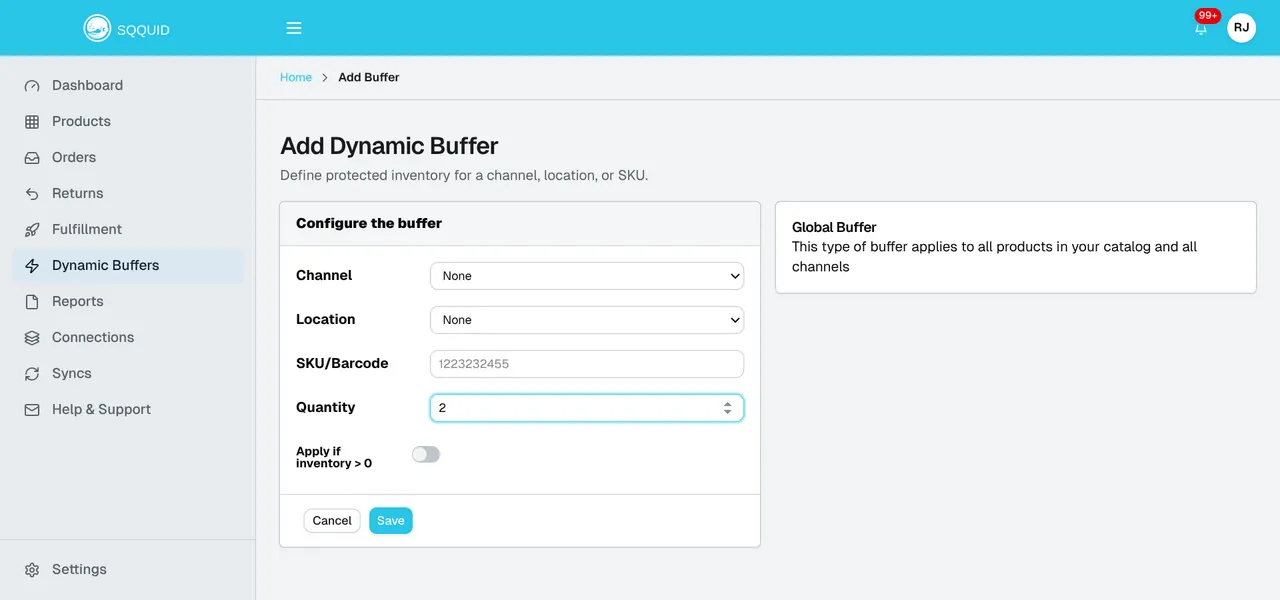
After saving, follow the change through to its destination:
- Confirm the rule was saved. Saving requests a background export; the confirmation does not establish that every channel has updated.
- Review the destination export in Syncs. Investigate failures using the sync activity guide, then inspect the SKU’s quantity on the store or marketplace, including its location where applicable. Our reliability and recovery overview explains the distinction between a completed source import and a verified destination update.
- Reconcile any remaining difference. Check overlapping buffers, Connection settings, location mappings, and product Sync switches. Export and channel processing take time, so verify the result instead of assuming a fixed completion deadline.
Does the same buffer also protect order routing?
Location buffers affect supported inventory-based routing only when its separate constraint is enabled. In Settings > Order Routing, enable Apply inventory buffers under Constraints for the Fewest locations first, Ranked locations, and Closest location rules, then check the routing preview. Pickup, dropship, sales-channel routing, and fallback have separate behavior; Connection-assigned location routing does not check inventory buffers. Review those paths independently before treating a selling buffer as protection for every assignment.
For a wider discussion of stock ownership, stores, and channels, explore multi-location retail and inventory management. If the worksheet reveals recurring failures between systems, the POS–ecommerce connector replacement guide can help frame whether the problem needs a connection change, clearer data ownership, or a different operating workflow. Bring the findings to that conversation so the review can start with a specific discrepancy and the systems involved.
Retail operations check
Where does your inventory workflow break?
Bring one recent oversell or failed pickup to a conversation about your retail stack. Include the SKU, location, source quantity, channel quantity, and what happened to the order.
Discuss your inventory workflowFrequently asked questions about inventory accuracy
Why does poor inventory accuracy cause oversells?
An oversell occurs when an accepted order cannot be supplied from the stock offered for sale. The underlying discrepancy may come from a missing unit, a reservation not reflected in availability, an incorrect location mapping, or a delayed channel update. Compare the physical count, calculated availability, and published quantity to identify which part of the workflow needs correction.
Can inventory be accurate in the POS but wrong online?
Yes. A POS can record physical stock correctly while an online channel uses an outdated quantity or a different availability rule. Check which system owns sellable inventory, whether the feed includes reservations and unavailable stock, and when the destination last received a successful update.
How often should a retailer count inventory?
Set the counting schedule around SKU movement, recurring discrepancies, and the consequences of getting availability wrong. Start with fast sellers and items involved in recent stock exceptions, then use the findings to adjust frequency. A small diagnostic sample helps prioritize work but does not replace a broader inventory control program.
Will a larger selling buffer fix inventory accuracy?
A buffer can reduce the quantity exposed for sale, but it does not correct a missing item, an incorrect mapping, or a failed update. Increasing it without investigating the cause can also hide stock that could have sold. Use it as a deliberate guardrail, check how it is applied, and keep the underlying discrepancy assigned to an owner.
Is inventory accuracy only a POS problem?
No. Multi-location accuracy depends on store receiving and counting, product and location matching, reservations, availability rules, synchronization, and fulfillment. Assign ownership at each handoff so a discrepancy can be traced to its cause and verified after correction.